Crew Capacity Planner
Stop guessing how many crews you need. Calculate exactly what it takes to hit your revenue goals—and whether you're understaffed or have room to grow.
The capacity question every contractor faces
You've got sales targets. You've got crews. But do the numbers actually work? Most contractors either oversell and can't deliver or understaff and leave money on the table.
The fix isn't hiring more salespeople or more crews randomly. It's understanding your actual capacity—and planning accordingly.
The Capacity Equation
It's simple math:
Revenue Target ÷ Avg Job Size = Jobs Needed
Jobs Needed × Days Per Job = Production Days
Production Days ÷ Days Per Crew = Crews Required
But don't forget:
- • Weather days and holidays
- • Travel time between jobs
- • Callbacks and rework
- • Training and meetings
Plan your crew capacity
Enter your targets and job details to see exactly how many crews you need.
Include setup, work, and cleanup time
Rain, snow, extreme heat, holidays
Account for travel, breaks, callbacks, rework
Leave at 0 to just calculate requirements
Crews Required
total workers needed
Hire more crew(s) to hit target You can do more with current crews Current capacity matches your target
Production Requirements
Per Crew Metrics
Revenue/Crew/Year
Jobs/Crew/Month
Jobs/Crew/Week
Revenue/Crew/Month
Industry benchmarks
How do top contractors structure their crews?
Revenue Per Crew
$500K-$1M
Jobs Per Crew Per Week
2-4 jobs
Efficiency Rate
75-90%
Lost to: travel, weather, callbacks, admin
How to maximize crew capacity
Cluster your jobs geographically
Schedule jobs in the same neighborhood back-to-back. Cut travel time from 20% of the day to 5%.
Pre-stage materials
Have materials delivered the day before. Crews start working immediately instead of waiting for delivery.
Reduce callbacks ruthlessly
Every callback costs you a half-day of production. Invest in quality checks before leaving the job.
Match crew size to job size
Don't send a 6-person crew to a 1-day job. Right-size crews and you'll do more jobs with the same people.
Build a weather backup plan
Have indoor work or repairs ready for rain days. Paying crews to sit home kills your efficiency rate.
Invest in crew leads
A great crew lead makes everyone 20% faster. Train them, pay them well, and watch capacity increase.
How ContractorHUB helps you maximize capacity
Stop managing production on whiteboards and spreadsheets. Get real visibility into crew capacity.
Production Scheduling
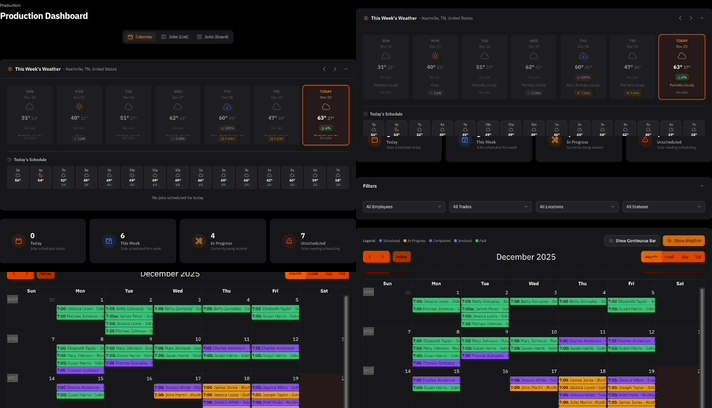
Visual calendar shows crew assignments, job status, and available capacity at a glance.
Route Optimization
Smart scheduling clusters jobs by location. Minimize drive time, maximize production time.
Crew Performance Tracking
See jobs completed, efficiency rates, and callbacks by crew. Know who's crushing it and who needs help.
Weather Integration
7-day forecast built into scheduling. Get alerts when weather threatens scheduled jobs.
Material Coordination
Sync material deliveries with crew schedules. No more crews waiting on supplies.
Capacity Forecasting
See weeks ahead. Know when you need to ramp up hiring or slow down sales.
More free tools for contractors
Plan smarter with our growing suite of business calculators.
Ready to optimize your production capacity?
See how ContractorHUB can help you schedule smarter, track crew performance, and hit your production targets.