
In the bustling world of roofing, clarity in "roofing roles and responsibilities" is crucial. However, the lines can often blur between job titles and the actual tasks that need completing. This can lead to confusion, inefficiency, and ultimately impact your bottom line. In this article, we’ll explore how you can bring clarity to your team, ensuring everyone knows precisely where they stand and what they need to do.
Understanding the Disconnect: Why Clarity Matters
No matter how experienced your crew, confusion over roles can occur. This is because job titles don't always clearly convey responsibilities. A foreman, for instance, might be seen as the person who oversees operations, but without clarity, team members may not know who makes critical decisions or resolves disputes.
Impact on Productivity
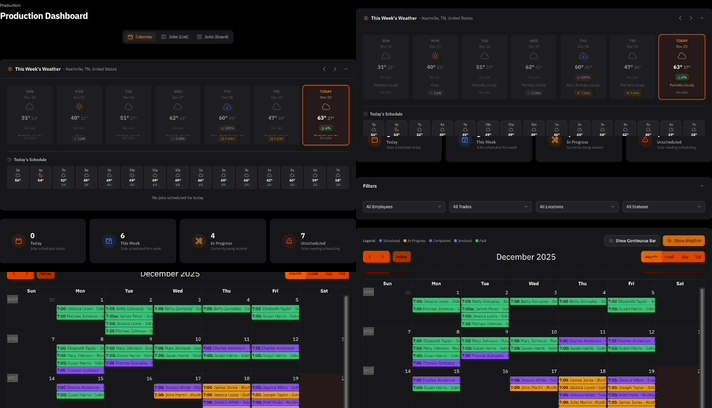
When teams aren’t clear about responsibilities, productivity drops. Misunderstandings about who owns what task can delay projects and cause work to slip through the cracks. This is where ContractorHUB's Crew Project Portal comes in, offering a centralized dashboard to track job accountability with ease.
Better Communication
Clear "roofing roles and responsibilities" foster better communication among crew members. By defining roles precisely, you'll prevent overlaps and gaps, ensuring that everyone can focus on their tasks and collaborate efficiently.
Defining Roles Clearly: Steps to Take
Identify Core Responsibilities
Every role, from roofer to project manager, should have a defined set of responsibilities. This can be documented and shared with your team via ContractorHUB’s SOP Manager, facilitating easy access and reference.
Create Detailed Job Descriptions
Update job descriptions to align with actual duties. Clear and detailed job descriptions help employees understand what is expected of them and reduce potential areas of conflict.
Use Tools for Accountability
Tools like ContractorHUB’s Employee Performance feature can track and document roles, ensuring tasks are aligned with individual strengths and responsibilities.
Promoting Ownership and Accountability
Ownership implies accountability. When your team knows their responsibilities, they take ownership of their projects, leading to improved performance and job satisfaction.
Set Performance Metrics
Metrics provide objective measures for evaluating responsibilities. ContractorHUB’s CRM and Financial Reporting features synchronize data so you can track performance and job costings accurately.
Encourage a Culture of Accountability
Foster an environment where team members feel responsible for outcomes. This can be enhanced through ContractorHUB’s collaboration tools, which streamline communication and accountability across projects.
The Role of Technology in Clarifying Responsibilities
Modern tools can alleviate some of the confusion in roles and responsibilities. ContractorHUB, with features like the SOP Manager and Employee Performance tracking, empowers roofing businesses to stay organized and efficient.
Facilitate Efficient Processes
Standardizing workflows using technology helps ensure that everyone knows their part, reducing reliance on verbal instructions and mitigating misunderstandings.
Track and Refine Continuously
By reviewing performance and refining roles as needed, you can adapt quickly to the ever-changing needs of your business. This continuous improvement helps maintain clarity and accountability.
Enhancing Roofing Teams Through Clarity
Ultimately, defining and clarifying "roofing roles and responsibilities" is essential for reducing confusion and enhancing team productivity. By leveraging tools like ContractorHUB, you can document responsibilities clearly, promote accountability, and foster a more cohesive work environment. Ready to see these benefits in action? Explore our features by requesting a demo of ContractorHUB.


